 GYM BOSS
Help Pro Shop and sundry sales
Updated November 2026
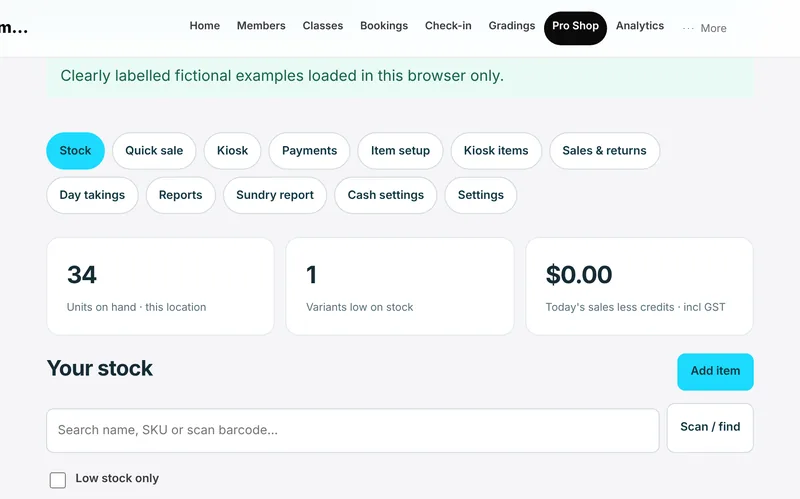
Pro Shop is ready to use with cash and your own EFTPOS machine. Charging a saved card, and card readers, are Coming soon.
Every sale is paid at the time. A member cannot run up an account balance, and no card surcharges are added.
Record a sale
- Open Pro Shop.
- For gear at the front desk, find the item with Scan / find or Quick sale, add it to the sale, and take payment.
- Tap Complete manual sale when the sale is paid. You can Print receipt if you need one.
- For coffee, cakes and snacks on a kiosk, use the kiosk basket, then choose Cash or EFTPOS (debit or credit card). For cash, tap Take cash (the button shows the amount). For EFTPOS, take the card on your own EFTPOS terminal first, then tap Record EFTPOS payment (the button shows the amount). Gym Boss doesn’t charge the card.
Payments can also be recorded with Record payment or Take payment on the payments screen. Cash and EFTPOS sales can be recorded against the member, juniors included.
Fix a mistake
Use Void sale (you’ll be asked for a reason) if you need to void a sale. The original stays on record with who, when and why. Use Refund / exchange for returns. Don’t use voids to create an unpaid tab — sales are paid at the time.
Stock and reports
Owners can add products with Add item, including size and colour variants, and Receive / adjust stock. Item costs are visible to owners only. There’s a sundry sales report you can Download CSV.
Members paying for memberships by card through Stripe Connect is Coming soon for every gym, and is separate from cash and EFTPOS Pro Shop sales. Charging a member’s saved card in the Pro Shop, and card readers, are also Coming soon. See Set up card payments with Stripe.
Related articles
Still stuck? Email hello@gymsoftware.io and tell us which screen you were on. We usually reply in a few hours.