 GYM BOSS
Help Getting started and your free trial
Updated November 2026
Every new gym gets a 30-day free trial. No card is needed to start, and nothing is charged automatically. Billing starts only when you choose to subscribe. Sign in and start your trial at app.gymsoftware.io.
Start your trial
- On the Gym Boss website, tap Start free trial, or open the sign-up page in the owner app.
- Enter your Gym name, Your name, Email and a Password (at least 10 characters).
- Add your mobile (optional), and choose your gym type from the list (What type of Gym are you running?).
- Tick that you agree to the Terms and Privacy Policy, then tap Start your 30-day free trial.
- You’ll see Check your inbox. Open the verification link we send you. Your trial starts once your email is confirmed.
If the email isn’t there in a minute, check spam or junk. Need a hand? Email hello@gymsoftware.io.
Your first days in the app
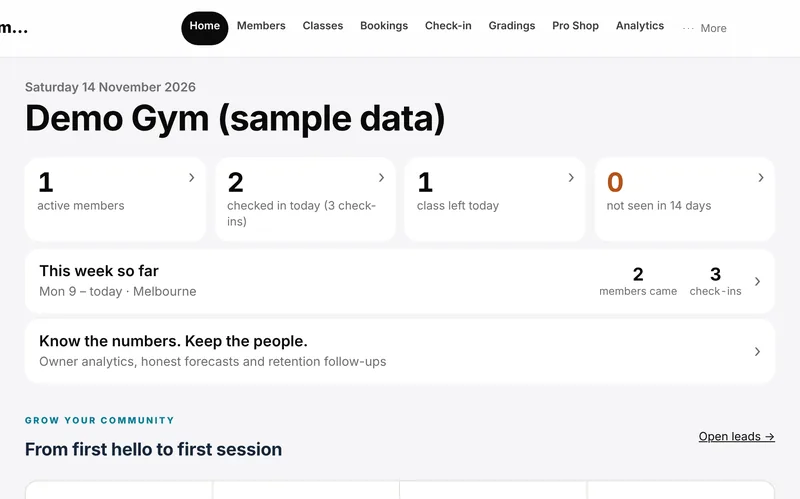
After you sign in, these are the jobs most owners do first:
- Check Gym settings (under Settings in the sidebar) so your gym name and contact email are right, and set your waiver text if you want your own wording.
- Add your memberships on Billing (under Settings) with + Add plan. Plans are a price list only for now — nobody is charged. Member card payments are Coming soon.
- Add your weekly classes on Classes with + Add class.
- Add people on Members with + Add member, or bring an existing list in with Import CSV.
- On the day, open Check-in, pick the class, find the member and tap Check in.
If you teach martial arts, rank tracking is ready — set it up under Gradings when you’re ready.
Related articles
Still stuck? Email hello@gymsoftware.io and tell us which screen you were on. We usually reply in a few hours.